MDCplus connects machines directly
Try it yourself Get guided demo25 June 2026
Direct CNC Connection vs Terminal vs Sensors
Comparing the three main ways to collect machine data: direct CNC/protocol connections, operator terminals, and external sensors, with a framework for choosing between them
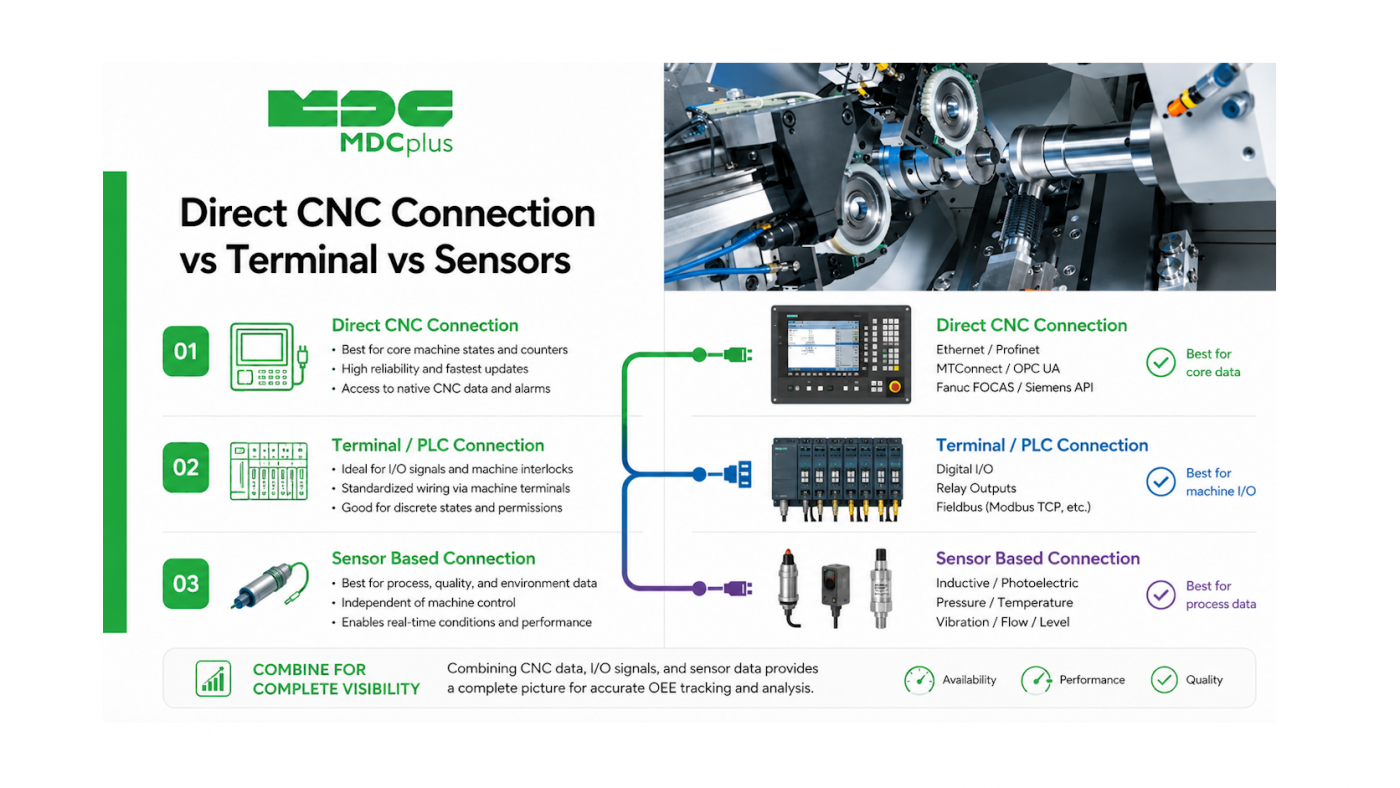
What to choose - Direct CNC Connection vs Terminal vs Sensors
Almost every machine monitoring project comes down to a choice between three fundamentally different ways of getting data off a machine: reading it directly from the controller, capturing it through an operator-facing terminal, or inferring it from external sensors. Each has a genuinely different cost, accuracy, and setup profile, and most real fleets end up using more than one depending on the machine. This article compares the three so the trade-offs are clear before committing to one.
Contents:
- The three approaches at a glance
- Direct CNC connection
- Terminal-based data collection
- Sensor-based (external) monitoring
- Side-by-side comparison
- Choosing between them
- Frequently asked questions
- Conclusion
The three approaches at a glance
- Direct connection reads data straight from the CNC controller or PLC through a protocol or vendor library — the richest, most automated source when it's available.
- Terminal-based collection puts a device (a tablet, a physical panel, a simple button box) at the machine for an operator to log events manually — job start/stop, downtime reason, part counts.
- Sensor-based monitoring infers machine state from something external — power draw, vibration, a light or signal tower — without connecting to the control system at all.
None of these is universally superior; they answer the question "how do I get data from this specific machine" differently depending on what the machine supports and what data actually matters.
Direct CNC connection
This is the approach covered throughout most of this blog's protocol content — MTConnect, OPC UA, FOCAS, LSV2, and similar interfaces that read structured data directly from the controller. It gives the richest picture: exact program names, precise cycle times, spindle load, detailed alarm codes, all captured automatically without relying on anyone to enter anything. The trade-off is that it depends entirely on the machine actually supporting an accessible interface, and setup can range from straightforward (a modern controller with native MTConnect) to involved (building a custom connector against a proprietary library). We go into this specific case in more depth in direct connection: CNC-PLC data collection.
Terminal-based data collection
A terminal — often a tablet or simple touchscreen mounted at the machine — asks the operator to actively log what's happening: starting and stopping a job, selecting a downtime reason from a list, confirming part counts. This approach doesn't depend on the machine's control system at all, which makes it usable on literally any equipment, including manual machines with no digital interface whatsoever. Its accuracy depends entirely on operator discipline, though: a terminal is only as good as the consistency with which people actually use it, and it introduces a data collection step that a direct connection doesn't need. It's also the most natural way to capture context that machine data alone can't provide, like why a stop happened or which job a cycle belongs to.
Sensor-based (external) monitoring
Where neither a direct connection nor operator input is practical, external sensors — current clamps, vibration sensors, or simple signal-tower readers — can infer basic machine state without touching the control system or requiring anyone to log anything. This is the least detailed of the three approaches (typically limited to running/idle/stopped inference) but also the least invasive and the fastest to deploy on equipment that would otherwise contribute no data at all. We cover this approach, along with PLC-level access for machines with partial connectivity, in more detail in connecting machines with no open protocol.
Side-by-side comparison
| Dimension | Direct connection | Terminal | Sensors |
|---|---|---|---|
| Data depth | High — program, cycle time, alarms, parameters | Moderate — whatever the operator logs | Low — inferred run/idle/stop state |
| Automation | Fully automatic | Depends on operator input | Fully automatic |
| Works on any machine | No — requires a supported interface | Yes — including manual machines | Yes — fully external |
| Captures "why," not just "what" | Limited to alarm codes | Strong, if used consistently | None |
| Setup effort | Varies by controller/protocol | Low to moderate | Low |
Choosing between them
- Use direct connection wherever the machine supports it. It's almost always the richer, more automated option when a workable interface exists, and should be the default choice for modern CNC equipment.
- Add a terminal where context matters, not just state. Even on machines with a direct connection, a lightweight terminal can capture downtime reasons and job context that machine data alone doesn't provide.
- Fall back to sensors for equipment that would otherwise contribute nothing. Manual machines, very old controllers, or auxiliary equipment with no practical connection option are still worth monitoring at a basic level rather than excluding them entirely.
- Combine methods rather than treating the choice as exclusive. A mixed fleet commonly uses all three simultaneously, and a monitoring platform that can normalize data from different methods into one dashboard removes the need to pick a single approach for the whole shop.
Frequently asked questions
Is terminal-based data collection accurate enough to trust for reporting?
It can be, but its accuracy is entirely dependent on consistent operator use. Terminals paired with simple, fast logging (a few taps rather than lengthy forms) tend to see better compliance, and combining terminal data with machine-sourced state as a cross-check improves overall reliability.
Can sensor-based monitoring replace a direct connection if the budget doesn't allow both?
It can be a reasonable starting point, particularly on machines with no other option, but it gives up significant data depth — program names, precise cycle times, and detailed alarm codes aren't available through external sensors alone.
Do I need a terminal if I already have direct connection data?
Not strictly, but many manufacturers add one anyway specifically to capture downtime reasons, since machine data alone typically confirms a stop occurred without explaining why, which limits how actionable the resulting reports are.
Which method is fastest to deploy across a large, mixed fleet?
Sensor-based monitoring is usually the quickest to roll out broadly, since it doesn't depend on machine-specific protocol work. Direct connection setup time varies significantly by controller brand and protocol availability.
Conclusion
Direct connection, terminals, and sensors aren't competing standards — they're different tools that answer different questions, with different costs and different ceilings on data depth. The practical approach for most fleets is to default to direct connection where it's available, use terminals to capture context that machine data can't, and use sensors to bring otherwise-invisible equipment into the picture rather than leaving it out entirely.
Related articles:
- Direct Connection: CNC-PLC Data Collection
- Connecting Machines with No Open Protocol
- CNC Data Acquisition: Architecture Basics
- Data Collection for Beginners
- MDCplus Machine Connectivity & Integrations
About MDCplus
Our key features are real-time machine monitoring for swift issue resolution, power consumption tracking to promote sustainability, computerized maintenance management to reduce downtime, and vibration diagnostics for predictive maintenance. MDCplus's solutions are tailored for diverse industries, including aerospace, automotive, precision machining, and heavy industry. By delivering actionable insights and fostering seamless integration, we empower manufacturers to boost Overall Equipment Effectiveness (OEE), reduce operational costs, and achieve sustainable growth along with future planning.
Ready to increase your OEE, get clearer vision of your shop floor, and predict sustainably?
Other articles
14.08.2026
How Do You Build a Mobile Dashboard Plant Managers Actually Use?
Building a mobile-first Tailwind PWA for plant managers: what belongs on a phone screen, offline behavior, push notifications, and prompts for an executive manufacturing dashboard
Read more
13.08.2026
How Do You Create Manufacturing KPI Widgets with Cursor and v0.dev?
Using v0.dev to generate manufacturing KPI widgets and Cursor to wire them into an existing dashboard repo: the two-tool workflow, prompts for scrap rate and MTTR/MTBF, and integration pitfalls
Read more
12.08.2026
How Do You Build a 3D Shop Floor Map Driven by Live PLC Data?
Building a 3D shop floor map with React Three Fiber: preparing CAD geometry for the web, mapping PLC tags to mesh colors, performance limits, and when 3D is the wrong choice.
Read more
11.08.2026
How Do You Design an Andon Display For Shop-Floor Using AI?
Prompting UI/UX for shop floor Andon displays: type scale for distance viewing, colorblind-safe status coding, glare and glove constraints, and prompts that produce factory-ready screens
Read more
10.08.2026
How Do You Get Live OPC UA Machine Data into Retool?
How to vibe-code a Retool custom component that streams live OPC UA machine data over WebSockets: the bridge service, security boundaries, and prompts for each layer
Read more