Make production transparent. Try MDCplus
Try it yourself Get guided demo05 August 2026
Vibe-Coding vs Low-Code: Which Is Better for Manufacturing Dashboards?
Vibe-coding vs low-code for manufacturing dashboards: a head-to-head comparison of speed, cost, customization, vendor lock-in, maintenance burden, and legacy MES integration
Vibe-Coding vs Low-Code: Which Is Better for Manufacturing Dashboards?
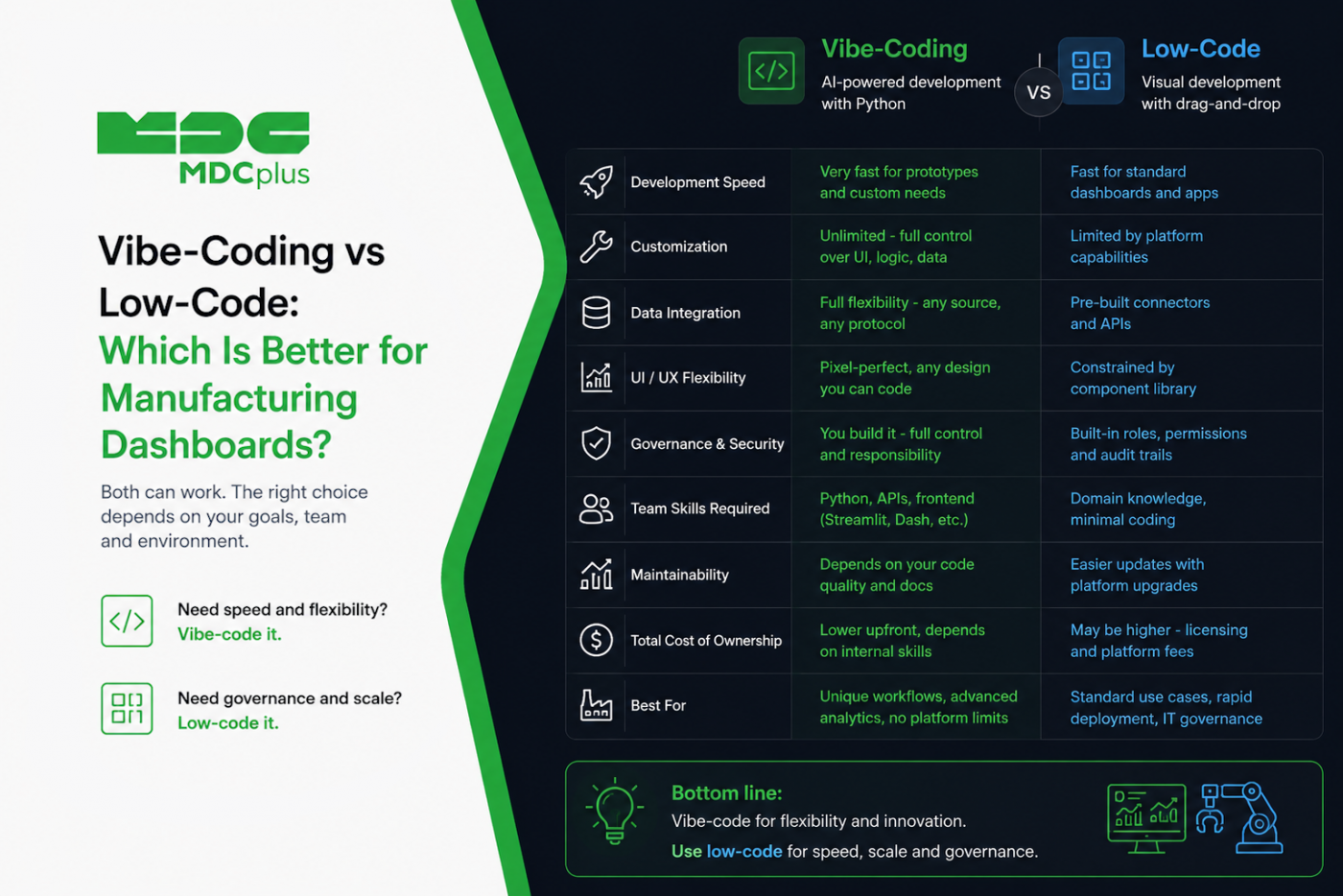
Short answer: low-code wins when you need governance, non-developer maintainability, and vendor support; vibe-coding wins when you need UI freedom, unusual integrations, or a dashboard nobody's platform offers out of the box. Neither is universally better, and the framing as a competition obscures the more useful question — which one fits the specific dashboard you're building, and who will maintain it in eighteen months. This article compares the two honestly across the dimensions that actually matter on a factory floor.
The quick verdict
| If you... | Lean toward |
|---|---|
| Need it maintained by non-developers after you leave | Low-code |
| Need a UI the platform's component library can't produce | Vibe-coding |
| Have strict IT governance and audit requirements | Low-code |
| Are integrating with a legacy MES with no standard connector | Vibe-coding |
| Need per-seat cost predictability across many viewers | Depends — see licensing below |
| Are prototyping to find out what people actually want | Vibe-coding |
Contents:
- What each approach actually means in 2026
- Speed: time to first working dashboard
- Customization ceiling
- Licensing and cost structure
- Vendor lock-in and portability
- Maintenance burden — the dimension people underestimate
- Legacy MES and unusual integrations
- Governance, security, and IT approval
- The hybrid approach most plants land on
- Frequently asked questions
- Conclusion
What each approach actually means in 2026
Low-code means building through a vendor's visual interface: dragging components onto a canvas, configuring data sources through connectors, wiring logic through a GUI. The output lives inside that platform. Think Retool, Power Apps, Mendix, or the dashboard builders embedded in MES and monitoring platforms themselves.
Vibe-coding means describing what you want to an AI model and having it write actual application code — Python, TypeScript, whatever fits — which you then run, review, and iterate on. The output is a normal codebase in a normal repository, just written mostly by prompt rather than by hand, as covered in our walkthrough of vibe-coding a shop floor dashboard.
The important shift is that vibe-coding has moved the comparison. Historically, "custom code vs low-code" was a trade of weeks of developer time against platform constraints, and low-code usually won on speed. When custom code takes an afternoon instead of a month, the calculation genuinely changes — but not in every dimension, which is what the rest of this article is about.
Speed: time to first working dashboard
This is closer than it used to be. Low-code platforms still win on the truly standard case — connecting a supported data source and displaying a chart from it is genuinely faster through a connector and a drag-and-drop canvas than through any amount of prompting. Vibe-coding wins the moment the requirement steps outside what the platform's components handle natively, because the low-code escape hatch (custom JavaScript blocks, custom components) is usually slower and more awkward than just writing the thing directly.
A rough rule: if your dashboard is a standard chart over a supported source, low-code is faster to a first version. If it involves any custom layout, unusual data shape, or non-standard interaction, vibe-coding pulls ahead quickly — and the gap widens with each additional non-standard requirement.
Customization ceiling
This is where the difference is starkest and least ambiguous. Low-code platforms have a hard ceiling defined by their component library; you can go right up to it quickly, and past it barely at all. For most business dashboards that ceiling is high enough to never notice. For manufacturing specifically, it gets hit more often than you'd expect: Andon displays needing to be legible from across a plant, 3D floor layouts, unusual density requirements for a control room wall, or interaction patterns designed for gloved hands on a shop floor terminal.
Vibe-coded output has effectively no ceiling — it's just code — but that freedom is only worth paying for if you actually need it. Choosing custom code for a dashboard that a standard component library would have handled fine means taking on the maintenance burden discussed below in exchange for nothing.
Licensing and cost structure
- Low-code typically charges per user, per app, or per platform capacity. This is predictable and easy to budget, but scales badly in a specific manufacturing scenario: when you want a dashboard visible to every operator on every shift, per-seat pricing gets expensive fast, and per-viewer costs can exceed the value of the dashboard itself.
- Vibe-coding has no per-viewer licensing — you're running your own application — but shifts cost to model usage during development, hosting, and, most significantly, the engineering time to maintain it. That last cost is real and recurring even though it doesn't arrive as an invoice.
The honest comparison isn't "license fee vs free." It's "predictable licensing plus vendor support" versus "no licensing plus your own maintenance responsibility." Which is cheaper depends heavily on how many people will view the dashboard and how much engineering capacity you actually have.
Vendor lock-in and portability
Low-code applications generally can't be exported and run elsewhere. If the vendor raises prices, changes direction, deprecates a feature you depend on, or goes away, your dashboards are affected and your options are limited. This is a genuine strategic risk on a ten-year horizon, which is a normal timeframe in manufacturing.
Vibe-coded output is ordinary code in your own repository — portable, inspectable, and not dependent on any vendor's continued goodwill. Worth noting, though, that it isn't entirely lock-in-free either: the code may depend on specific frameworks or hosting, and if nobody on the team can read what was generated, you have a different kind of dependency — on whoever (or whatever) can still make sense of it.
Maintenance burden — the dimension people underestimate
This is the dimension that most often decides the question in practice, and the one most often skipped during the initial excitement of building something quickly.
A low-code app can typically be modified by whoever inherits it, including non-developers, using the same visual interface it was built in. The platform handles security patches, runtime updates, and browser compatibility. This matters enormously in manufacturing, where the person who built a tool frequently isn't the person maintaining it three years later.
Vibe-coded applications are real applications with real maintenance needs: dependency updates, security patches, breaking changes in libraries, hosting. And there's a specific risk worth naming — code generated quickly by prompt, without careful review, can be harder to maintain than deliberately written code, because nobody ever fully understood the design decisions embedded in it. The mitigation isn't to avoid vibe-coding; it's to review generated code, keep it in version control, and document the parts that matter, which many teams skip precisely because the initial build felt so effortless.
Legacy MES and unusual integrations
Manufacturing has an unusually high concentration of systems that no low-code platform has a connector for: a twenty-year-old MES with an undocumented database schema, a proprietary controller protocol, a machine that only exposes data through a serial connection and a text file. This is where vibe-coding has a decisive practical advantage — writing custom integration code against an unusual source is exactly the kind of well-defined, contained problem AI models handle well, and low-code platforms simply have no path to it beyond an escape hatch that's often more painful than writing the code directly.
Where a standard connector does exist — a documented REST API, a common SQL database, an MQTT broker — the advantage disappears and low-code's connector is usually the faster route.
Governance, security, and IT approval
Low-code platforms generally arrive with the things enterprise IT asks for: role-based access control, audit logging, SSO integration, a vendor with a security posture someone can review. Getting a low-code app approved is usually a shorter conversation than getting a custom application approved.
Vibe-coded applications need all of that built or configured deliberately — authentication, access control, audit trails, secure credential handling. None of it is difficult to prompt for, but all of it is easy to skip when the goal was "get a dashboard up quickly," and it's exactly what a security review will ask about. If the dashboard will touch sensitive process data or sit on a network with machine access, the governance considerations covered in our pieces on manufacturing data governance and shop floor network setup apply regardless of how the app was built.
The hybrid approach most plants land on
In practice, the sensible pattern isn't picking one for everything:
- Vibe-code the prototype, then decide. Building a fast custom version first is an excellent way to discover what people actually want before committing to a platform — requirements for internal dashboards are notoriously unreliable until someone sees a real one.
- Low-code for standard, long-lived, widely-maintained tools. Anything that will outlive its author and be modified by non-developers belongs where non-developers can modify it.
- Vibe-code the parts with no other option. Legacy integrations, unusual UIs, and one-off analyses that don't justify a platform seat.
- Use vibe-coding to extend low-code. Custom components inside a low-code platform are themselves a good vibe-coding target — you get the platform's governance and maintainability with a custom escape hatch where you need it, an approach we cover concretely for one platform in vibe-coding OPC UA data into Retool.
Frequently asked questions
Is vibe-coding actually production-ready for manufacturing tools?
For internal dashboards and analysis tools, yes, with normal software discipline — code review, version control, error handling, and security configuration. For anything safety-related or that writes commands back to equipment, the bar is considerably higher and the same caution applies as to any custom software touching production systems.
Won't low-code platforms just add AI generation and close the gap?
Many are adding AI-assisted building, which does narrow the speed gap on standard cases. It doesn't change the structural differences though: the customization ceiling, the portability of the output, and the per-seat licensing model are properties of the platform approach itself, not of how you author within it.
Which approach is better for dashboards operators will use on the floor?
It depends on how unusual the interface needs to be. Standard status displays are well within low-code's range; Andon screens with specific legibility, contrast, and interaction requirements for a factory environment often exceed it, which is where custom code earns its maintenance cost.
What's the biggest mistake teams make choosing between these?
Deciding based on time-to-first-version alone. That's the cheapest, most visible cost and the least important one — maintenance burden, who can modify it later, and licensing at full viewer count all matter more over the life of a dashboard than whether it took two hours or two days to build.
Conclusion
Vibe-coding has genuinely changed this comparison by removing custom code's biggest historical disadvantage — the time it took. What it hasn't changed is everything downstream of the initial build: who maintains it, who can modify it, and what happens when the person who prompted it into existence moves on. Low-code buys governance and maintainability at the cost of a customization ceiling and per-seat licensing; vibe-coding buys freedom and portability at the cost of owning the maintenance yourself. Most plants end up using both, deliberately, for the cases each actually fits.
Related articles:
- How Do You Vibe-Code a Real-Time Shop Floor Dashboard with Claude and Python?
- How Do You Prompt-Engineer a Custom OEE Dashboard for Your Machines?
- Why Custom Manufacturing Dashboards Matter
- Data Governance for Manufacturing Data
- MDCplus Machine Connectivity & Integrations
About MDCplus
Our key features are real-time machine monitoring for swift issue resolution, power consumption tracking to promote sustainability, computerized maintenance management to reduce downtime, and vibration diagnostics for predictive maintenance. MDCplus's solutions are tailored for diverse industries, including aerospace, automotive, precision machining, and heavy industry. By delivering actionable insights and fostering seamless integration, we empower manufacturers to boost Overall Equipment Effectiveness (OEE), reduce operational costs, and achieve sustainable growth along with future planning.
Ready to increase your OEE, get clearer vision of your shop floor, and predict sustainably?
Other articles
14.08.2026
How Do You Build a Mobile Dashboard Plant Managers Actually Use?
Building a mobile-first Tailwind PWA for plant managers: what belongs on a phone screen, offline behavior, push notifications, and prompts for an executive manufacturing dashboard
Read more
13.08.2026
How Do You Create Manufacturing KPI Widgets with Cursor and v0.dev?
Using v0.dev to generate manufacturing KPI widgets and Cursor to wire them into an existing dashboard repo: the two-tool workflow, prompts for scrap rate and MTTR/MTBF, and integration pitfalls
Read more
12.08.2026
How Do You Build a 3D Shop Floor Map Driven by Live PLC Data?
Building a 3D shop floor map with React Three Fiber: preparing CAD geometry for the web, mapping PLC tags to mesh colors, performance limits, and when 3D is the wrong choice.
Read more
11.08.2026
How Do You Design an Andon Display For Shop-Floor Using AI?
Prompting UI/UX for shop floor Andon displays: type scale for distance viewing, colorblind-safe status coding, glare and glove constraints, and prompts that produce factory-ready screens
Read more
10.08.2026
How Do You Get Live OPC UA Machine Data into Retool?
How to vibe-code a Retool custom component that streams live OPC UA machine data over WebSockets: the bridge service, security boundaries, and prompts for each layer
Read more